General Transfer
Overview
DApp requires users to initiate a TRX transfer.
Prerequisite: The DApp connection has been authorized via
eth_requestAccounts(see Start Developing).
It takes 3 steps to initiate a transfer on the TRON network:
-
Create a transfer transaction
-
Sign the transaction
-
Broadcast the signed transaction
In this process, Step 2 requires TronLink while both Step 1 and 3 happen on tronWeb.
Specification
Example
const tronweb = window.tron.tronWeb;
const fromAddress = tronweb.defaultAddress.base58;
const toAddress = "TAHQdDiZajMMP26STUnfsiRMNyXdxAJakZ";
const tx = await tronweb.transactionBuilder.sendTrx(toAddress, 10, fromAddress); // Step 1
try {
  const signedTx = await tronweb.trx.sign(tx); // Step 2
  await tronweb.trx.sendRawTransaction(signedTx); // Step 3
} catch (e) {
  // error handling
}
When “await tronweb.trx.sign(tx);” is executed, a pop-up window will show in the TronLink wallet asking the user to confirm, as shown below:
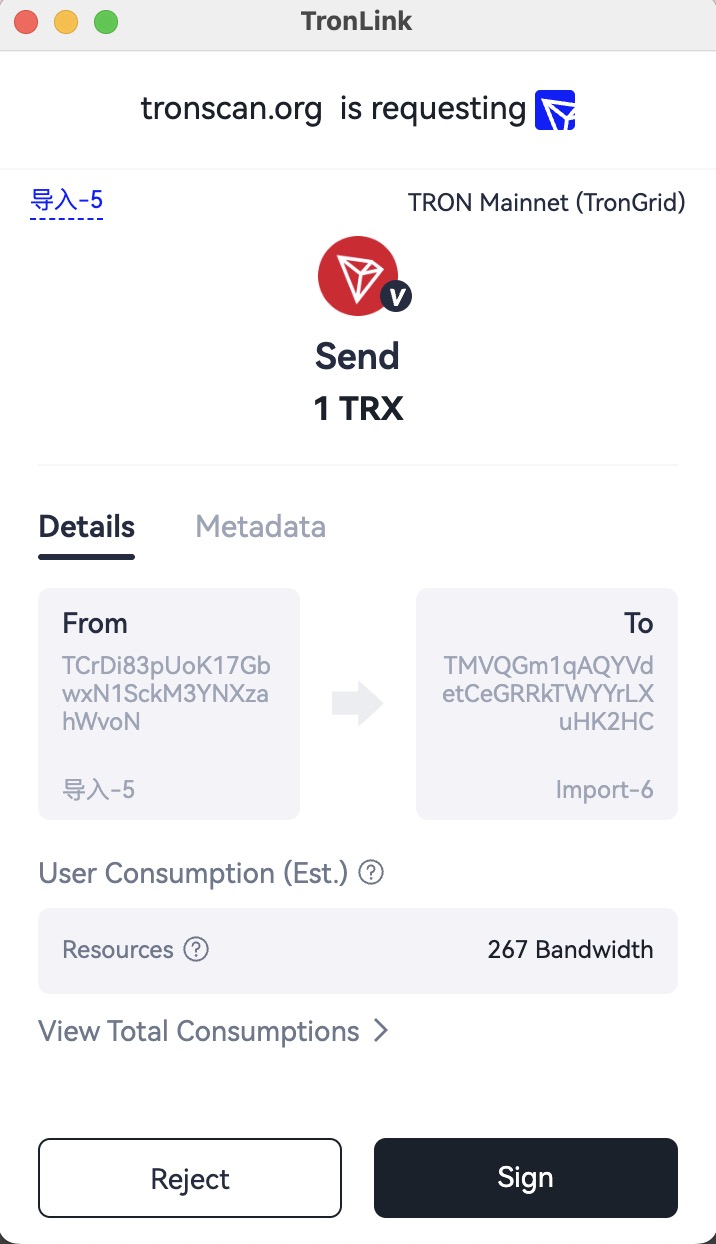
If the user chooses on “Reject” in the pop-up window, an exception will be thrown, which the developer can catch for further processing.
If the user chooses “Sign” in the pop-up window, the DApp receives and broadcasts the signed transaction.
Errors
The DApp provider surfaces errors as JavaScript exceptions with .code / .message. The codes you will encounter on this call:
| Code | Meaning | Where it comes from | Retryable? |
|---|---|---|---|
4001 | User clicked Reject in the signing popup | tronWeb.trx.sign(tx) | No — user declined |
| (thrown) | Invalid address / Invalid amount / etc. | transactionBuilder.sendTrx(...) before any wallet interaction | No — fix the input |
REVERT / OUT_OF_ENERGY / FAILED | Broadcast succeeded but execution failed on-chain | sendRawTransaction result or tronWeb.trx.getTransactionInfo(txid) | No — the tx is final; never auto-retry |
| (network error) | TronGrid / RPC transient failure | sendRawTransaction HTTP layer | Yes — back off and retry |
For cross-surface translation (DApp ↔ DeepLink ↔ MCP ↔ CLI) see the Error Code Map.