Proactively Request TronLink Plugin Features
Connect Website TIP-1102
Overview
TronLink can be used to manage wallet private keys. Before performing operations that require signatures, a DApp must connect to TronLink and obtain user signature authorization through TronLink. This protocol explicitly informs users that the DApp is proactively requesting a TronLink connection and requests their authorization consent.
This method follows the Ethereum EIP-1102 protocol.
Technical Specification
Code Example
try {
  await window.tron.request({method: 'eth_requestAccounts'});
} catch (e) {}
Return Value
If successful, an array is returned with a single element — the currently approved TronLink account. Example:
['TMVQGm1qAQYVdetCeGRRkTWYYrLXuHK2HC']
If it fails, an error code and error message will be returned. See the Error Codes section below.
Error Codes
| Error Code | Name | Description |
|---|---|---|
| 4001 | User rejected request | Triggered when the user clicks “Reject” or closes the popup |
| -32002 | Another process in progress | Another DApp process is ongoing, request cannot execute |
| -32602 | Invalid parameters | Invalid or extra parameters were provided |
| 4200 | Method not supported | This method is not supported |
Interaction Flow
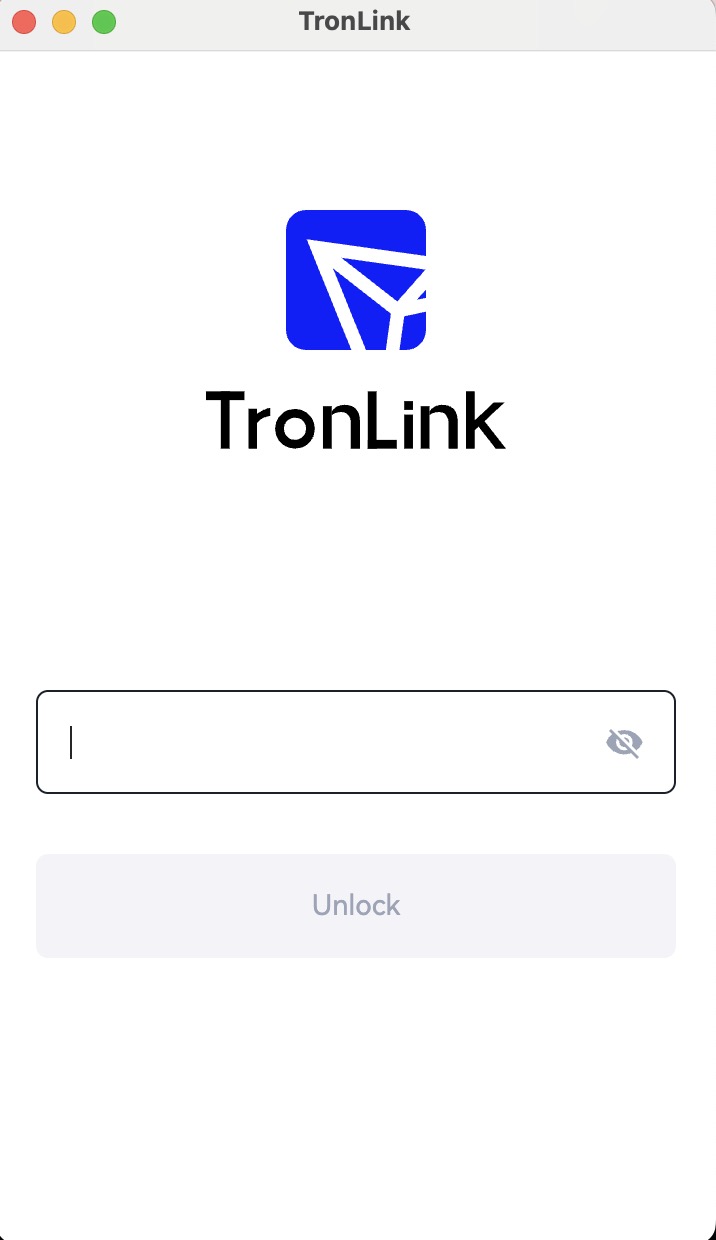
After triggering eth_requestAccounts, if TronLink is locked, an unlock popup appears:
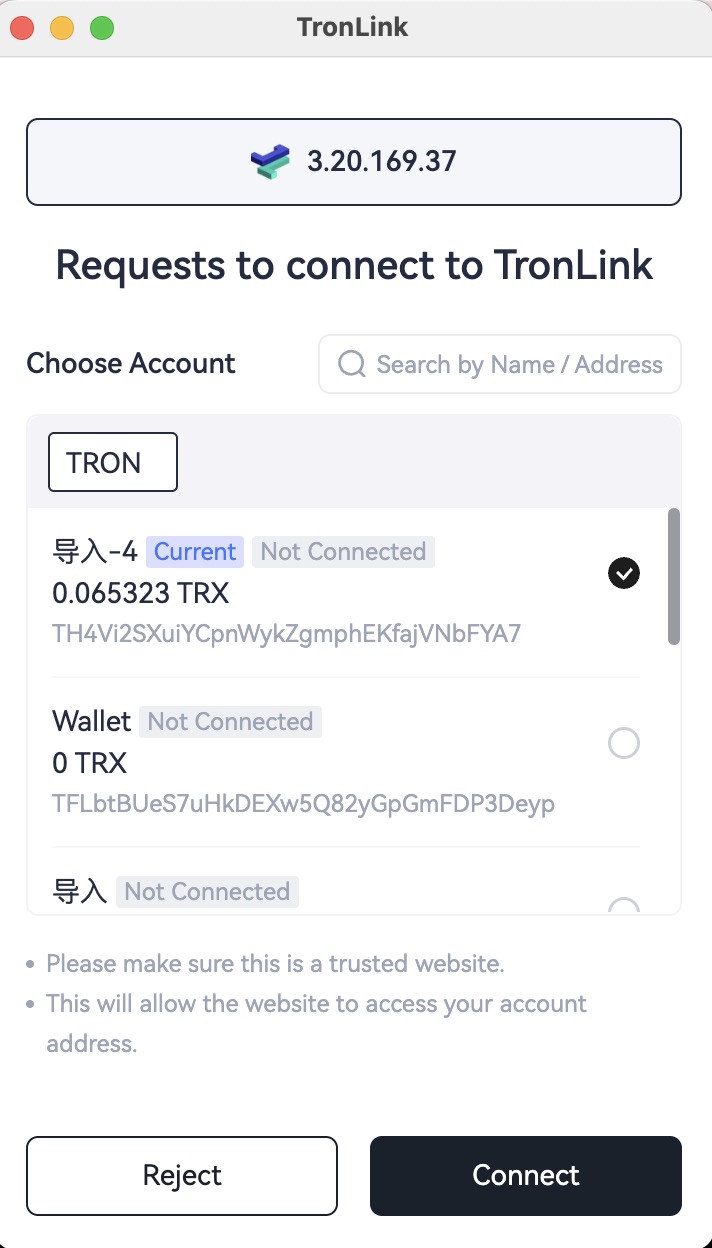
After unlocking, or if already unlocked, a connection confirmation popup appears:
Legacy (not recommended): Legacy: tron_requestAccounts
Get TronLink Provider via TIP-6963
Introduction
When multiple wallets exist simultaneously, they may compete to occupy the window.tron object. To ensure that a DApp can obtain a specific wallet provider, the TIP-6963 specification is implemented.
Technical Specification
Code Example
interface TIP1193Provider {
  request: (args: RequestArguments) => Promise<unknown>;
  on(event: string, listener: (...args: any[]) => void): this;
  removeListener(event: string, listener: (...args: any[]) => void): this;
  tronWeb: TronWeb;
  [key: `is${string}`]: boolean;
}

/**
 * Represents the assets needed to display a wallet
 */
interface TIP6963ProviderInfo {
  uuid: string;
  name: string;
  icon: string;
  rdns: string;
}

interface TIP6963ProviderDetail {
  info: TIP6963ProviderInfo;
  provider: TIP1193Provider;
}

// Announce Event dispatched by a Wallet
interface TIP6963AnnounceProviderEvent extends CustomEvent {
  type: "TIP6963:announceProvider";
  detail: TIP6963ProviderDetail;
}

// The DApp listens to announced providers
window.addEventListener(
  "TIP6963:announceProvider",
  (event: TIP6963AnnounceProviderEvent) => {

    // Confirm if it is a Tronlink UUID
    if (event.detail.info.rdns !== 'org.tronlink.www' || event.detail.info.name !== 'TronLink') {
      console.error('it is NOT TronLink provider');
      return;
    }

    // event.detail.provider === window.tron
    const tronProvider = event.detail.provider;

    tronProvider.on('accountsChanged', (accountArray) => {
      console.log('tip-6963 accountsChanged', accountArray);
    })
  }
);

// The DApp dispatches a request event which will be heard by
// Wallets' code that had run earlier
window.dispatchEvent(new Event("TIP6963:requestProvider"));
org.tronlink.www, and its name is TronLink. Normal Transfer
Prerequisite: The DApp connection has been authorized via
eth_requestAccounts(see Connect Website TIP-1102 above).
Overview
A DApp needs the user to initiate a TRX transfer.
A transfer on the TRON network requires three steps:
- Construct the transaction
- Sign the transaction
- Broadcast the signed transaction
TronLink handles step 2 (signing), while steps 1 and 3 must be completed using TronWeb.
Technical Specification
Code Example
const tronweb = window.tron.tronWeb;
const fromAddress = tronweb.defaultAddress.base58;
const toAddress = "TDvSsdrNM5eeXNL3czpa6AxLDHZA9nwe9K";
const tx = await tronweb.transactionBuilder.sendTrx(toAddress, 10, fromAddress);

try {
  const signedTx = await tronweb.trx.sign(tx);
  await tronweb.trx.sendRawTransaction(signedTx);
} catch (e) {}
When executing await tronweb.trx.sign(tx);, TronLink displays a confirmation popup.
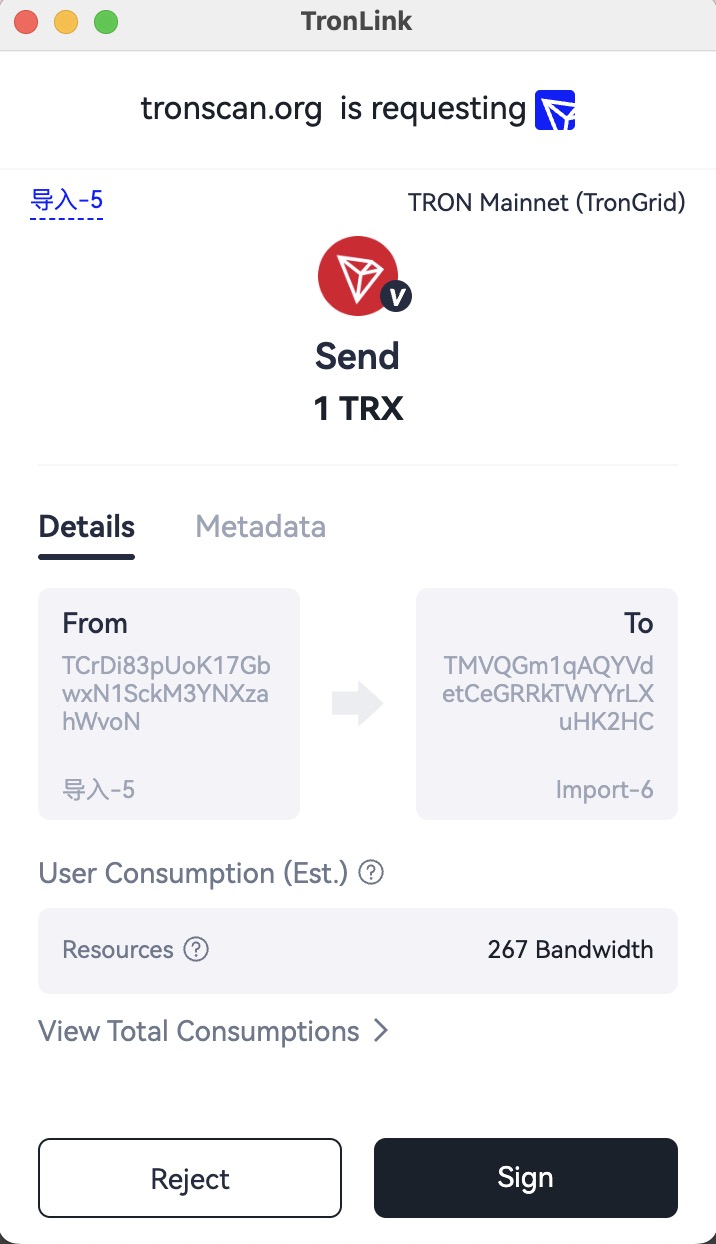
Reject → exception thrown. Sign → signed transaction returned for broadcasting.
Legacy (not recommended): Legacy: sendTrx via window.tronLink
Multi-Signature Transfer
Prerequisite: The DApp connection has been authorized via
eth_requestAccounts(see Connect Website TIP-1102 above).
Overview
Refer to Normal Transfer above.
Technical Specification
Code Example
const tronweb = window.tron.tronWeb;
const toAddress = "TDvSsdrNM5eeXNL3czpa6AxLDHZA9nwe9K";
const activePermissionId = 2;

const tx = await tronweb.transactionBuilder.sendTrx(
    toAddress, 10,
    { permissionId: activePermissionId}
);

try {
  const signedTx = await tronweb.trx.multiSign(tx, undefined, activePermissionId);
  await tronweb.trx.sendRawTransaction(signedTx);
} catch (e) {}
Rejecting triggers an exception; signing returns the signed transaction for broadcasting.
Legacy (not recommended): Legacy: multiSign via window.tronLink
Message Signing
Prerequisite: The DApp connection has been authorized via
eth_requestAccounts(see Connect Website TIP-1102 above).
Overview
A DApp may require users to sign a hex message. The signed message is then sent to the backend for verification to authenticate user login.
Technical Specification
Code Example
const tronweb = window.tron.tronWeb;

try {
  const message = "0x01EF";
  const signedString = await tronweb.trx.signMessageV2(message);
} catch (e) {}
Parameter
window.tron.tronWeb.trx.signMessageV2 accepts a hexadecimal string representing the message to sign.
Return Value
If signed successfully:
0xaa302ca153b10dff25b5f00a7e2f603c5916b8f6d78cdaf2122e24cab56ad39a79f60ff3916dde9761baaadea439b567475dde183ee3f8530b4cc76082b29c341c
If an error occurs:
Uncaught (in promise) Invalid transaction provided
Interaction Flow
When executing signing, TronLink shows a confirmation popup with the hex message.
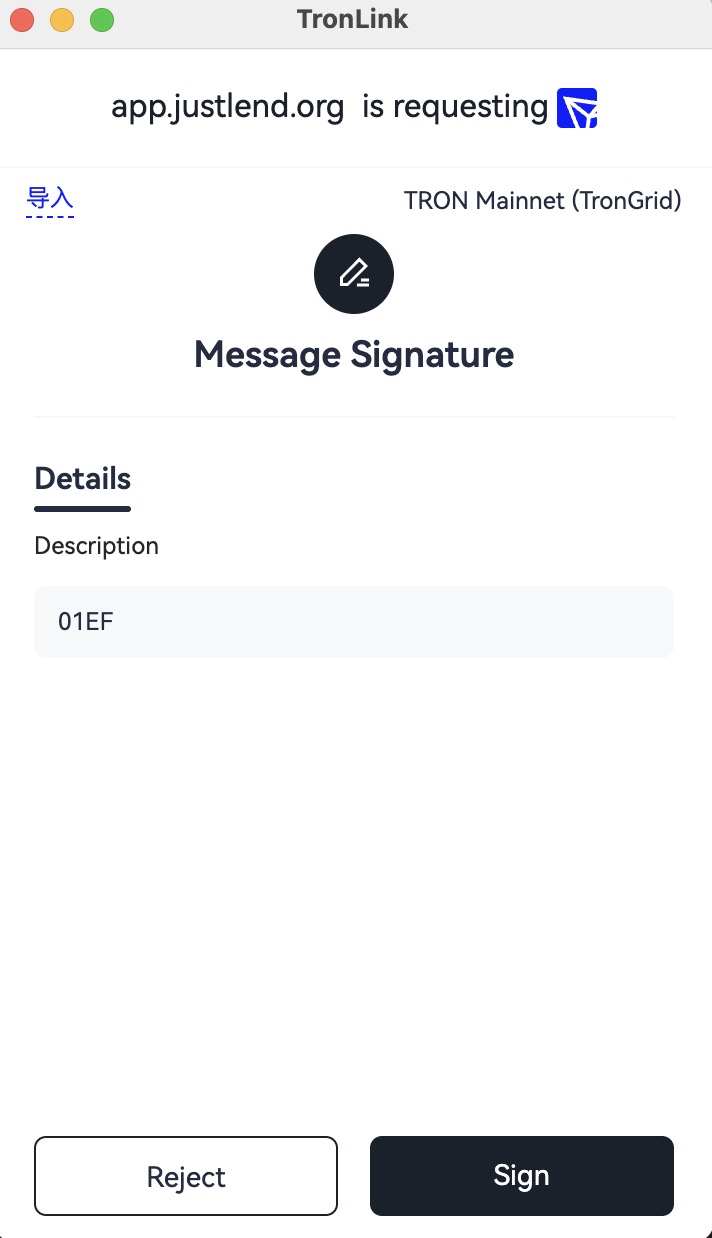
Reject → exception. Sign → signed message returned.
Legacy (not recommended): Legacy: signMessageV2 via window.tronLink
Add Asset
Prerequisite: The DApp connection has been authorized via
eth_requestAccounts(see Connect Website TIP-1102 above).
Overview
A DApp can provide a button allowing users to directly add a token to their TronLink asset list.
Technical Specification
Code Example
const res = await window.tron.request({
  method: 'wallet_watchAsset',
  params: {
    type: 'trc20',
    options: {
        address: 'TR7NHqjeKQxGTCi8q8ZY4pL8otSzgjLj6t'
    }
  },
});
Parameters
interface WatchAssetParams {
  type: 'trc10' | 'trc20' | 'trc721';
  options: {
    address: string;
    symbol?: string;
    decimals?: number;
    image?: string;
  }
}
- method:
wallet_watchAsset - type:
trc10,trc20,trc721 - address: token contract address or token ID (required)
Return Value
No return value.
Interaction Flow
Add TRC10
await window.tron.request({
  method: 'wallet_watchAsset',
  params: {
    type: 'trc10',
    options: { address: '1002000' },
  },
});
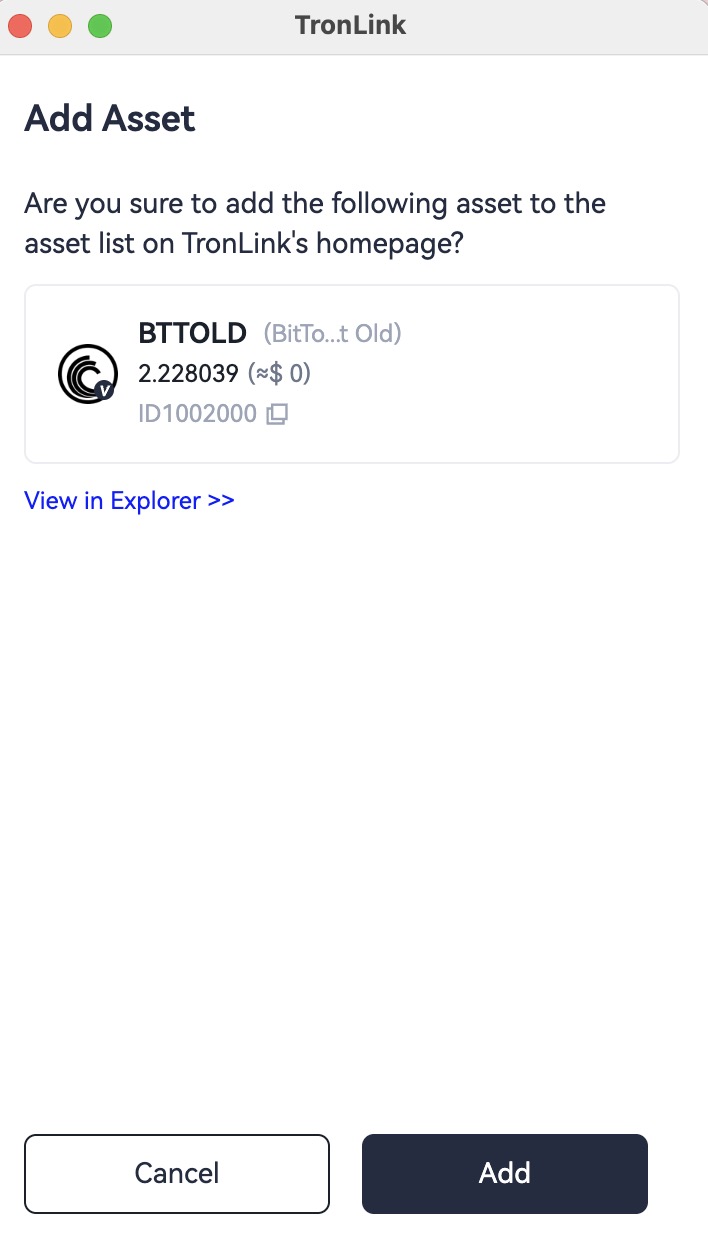
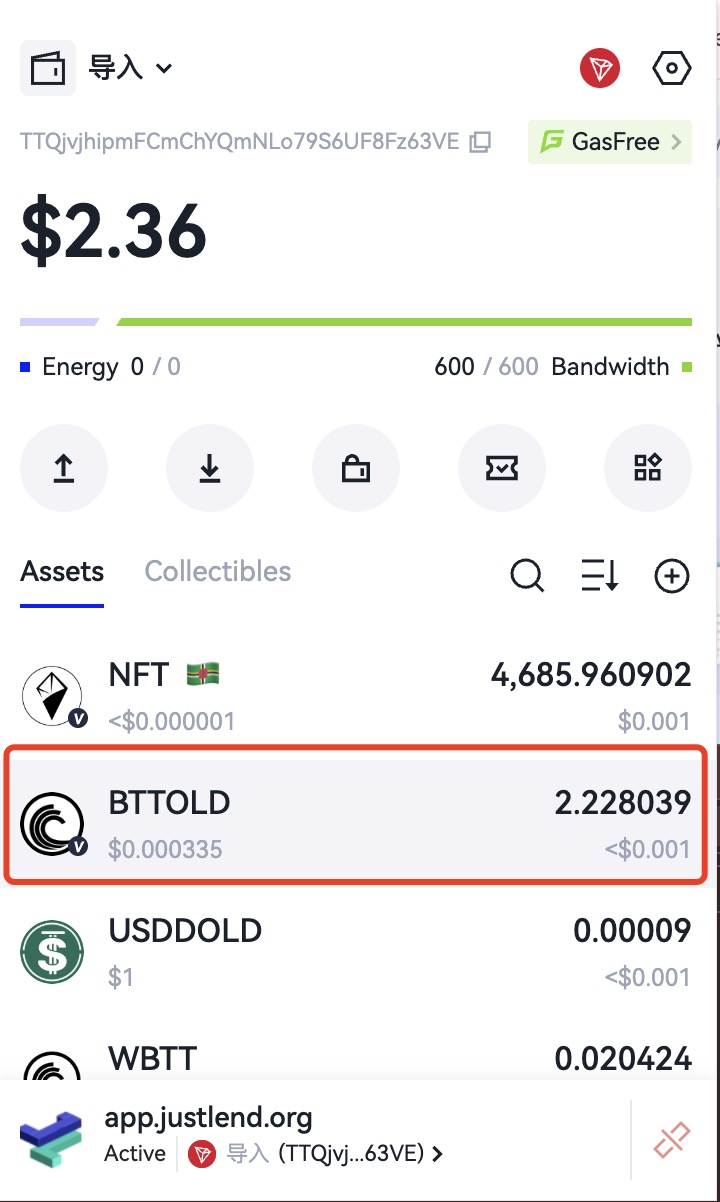
Click the “Add” button and the asset will be added to the asset list, as shown below.
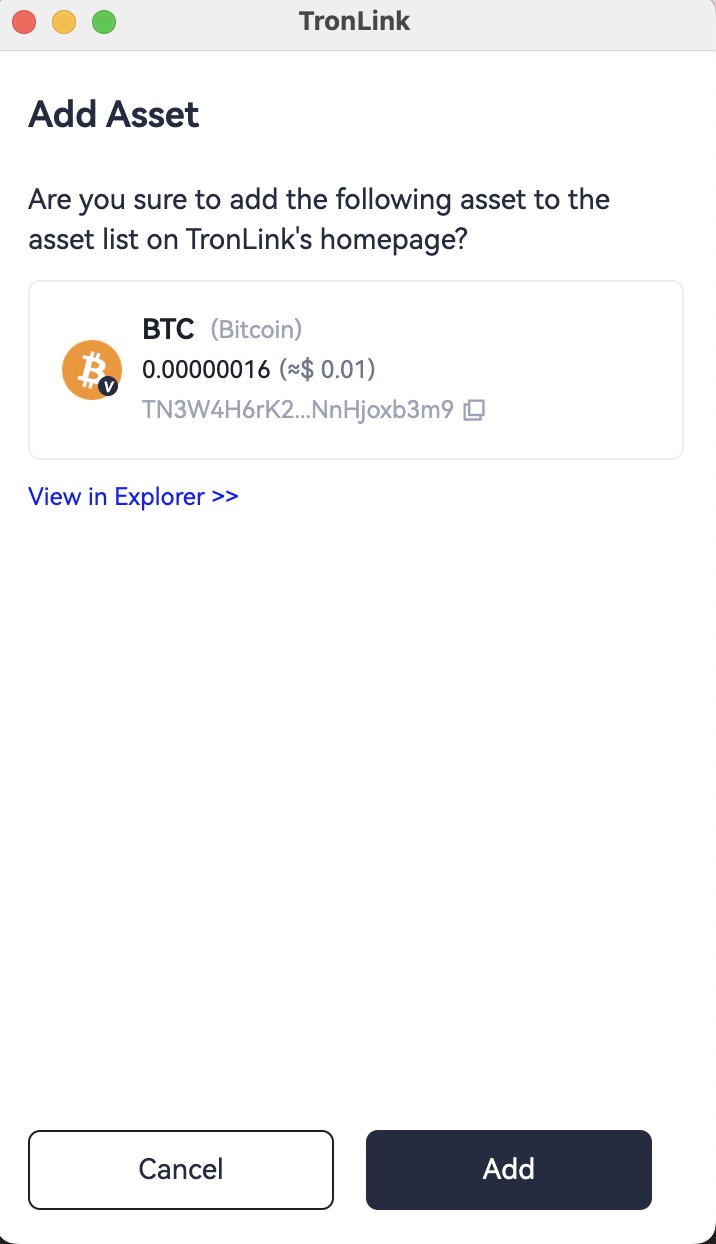
Add TRC20
await window.tron.request({
  method: 'wallet_watchAsset',
  params: {
    type: 'trc20',
    options: { address: 'TN3W4H6rK2ce4vX9YnFQHwKENnHjoxb3m9' },
  },
});
When the code executes, TronLink will display an add-asset popup where the user can confirm adding the TRC20 asset or cancel the request.
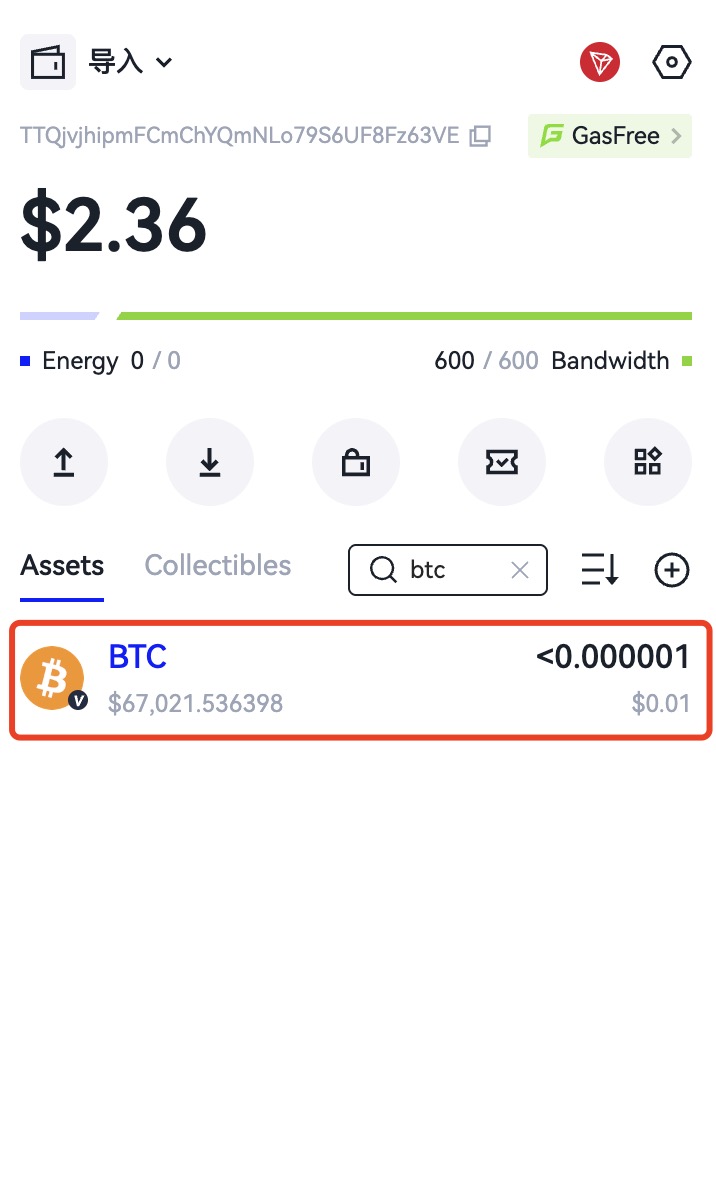
Click the “Add” button and the asset will be added to the asset list, as shown below.
Add TRC721
await window.tron.request({
  method: 'wallet_watchAsset',
  params: {
    type: 'trc721',
    options: { address: 'TVtaUnsgKXhTfqSFRnHCsSXzPiXmm53nZt' },
  },
});
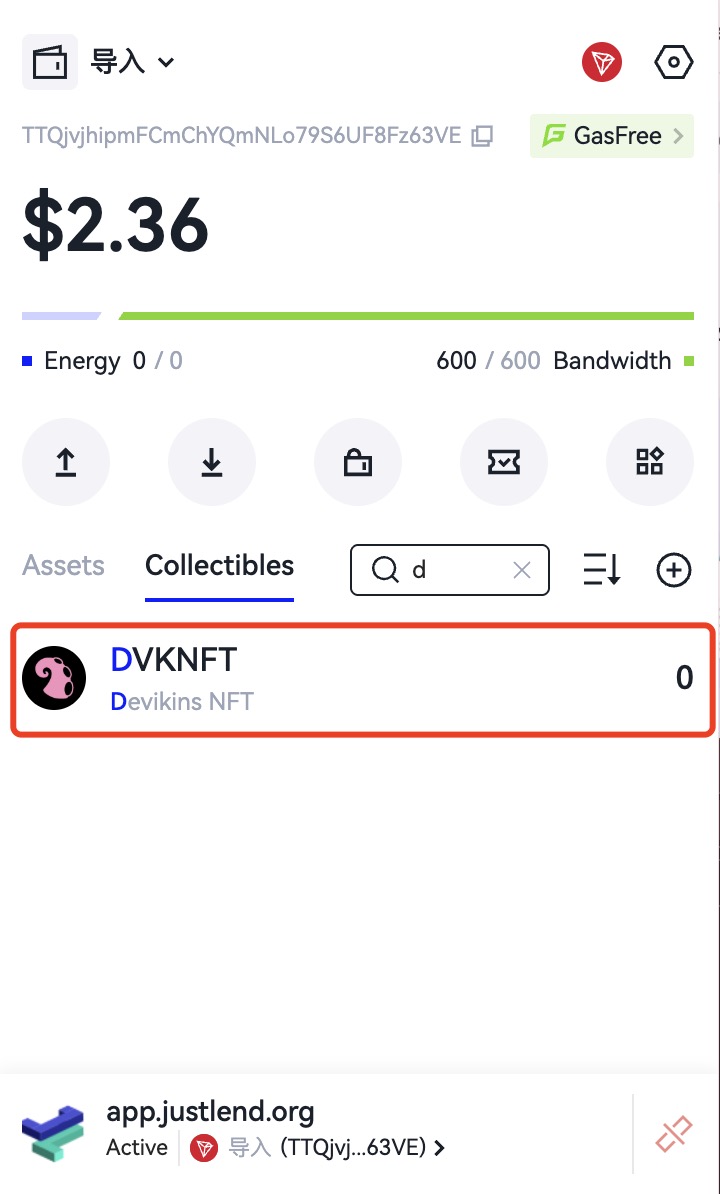
When the code executes, TronLink will display an add-asset popup where the user can confirm adding the TRC721 asset or cancel the request.
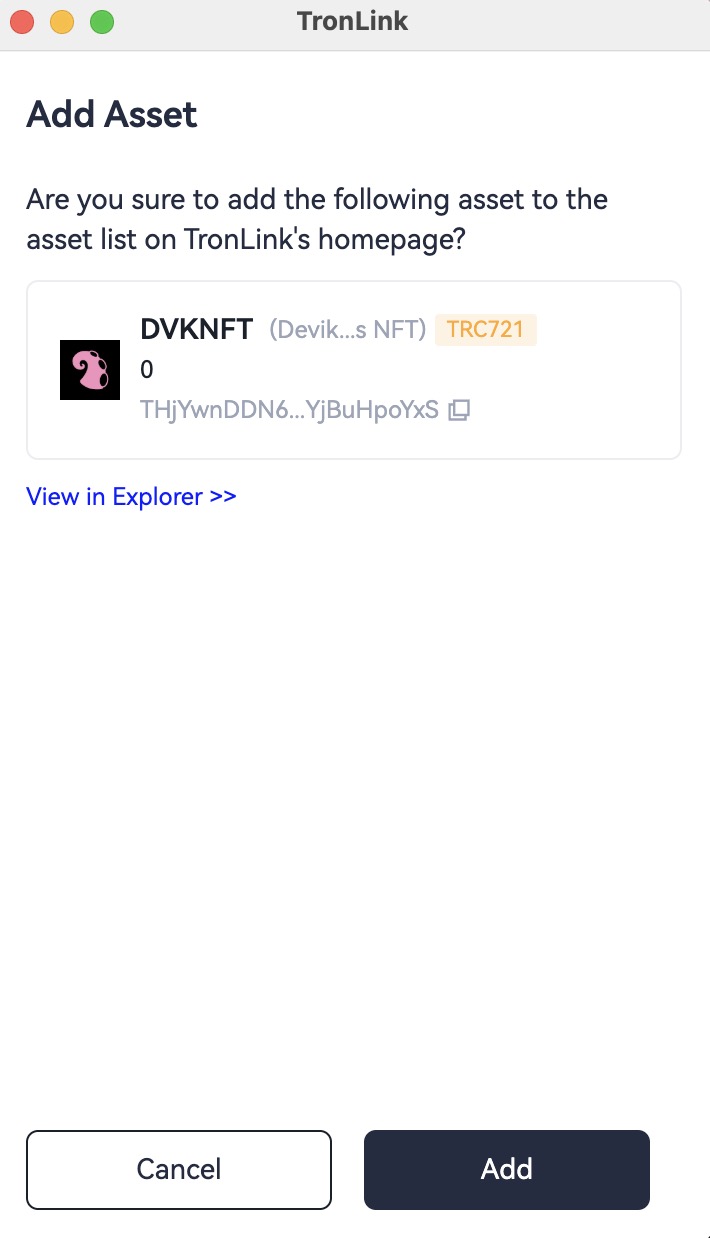
Click the “Add” button and the asset will be added to the asset list, as shown below.
Legacy (not recommended): Legacy: wallet_watchAsset via window.tronLink
Switch Network TIP-3326
Overview
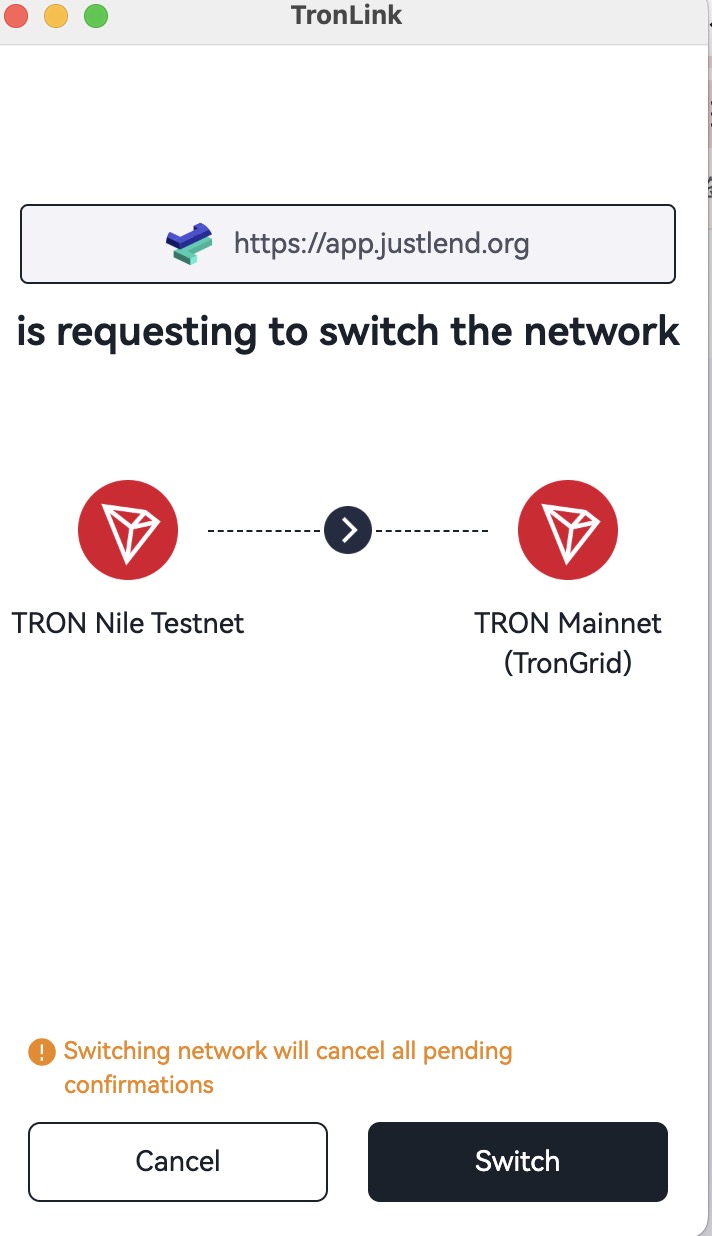
Most DApps operate on specific chains. This protocol allows a DApp to request TronLink to switch chains, with user confirmation.
After approval, the DApp can operate normally on that chain.
This protocol follows EIP-3326.
Technical Specification
Code Example
try {
  await window.tron.request({
    method: 'wallet_switchEthereumChain',
    params: [{chainId: '0x2b6653dc'}]
  });
} catch (e) {}
Parameters
interface SwitchTronChainParameter {
  chainId: string;
}
Supported chain IDs:
- Mainnet:
0x2b6653dc - Shasta Testnet:
0x94a9059e - Nile Testnet:
0xcd8690dc
Return Value
- Success →
null - Failure → error code + message
Error Codes
| Error Code | Name | Description |
|---|---|---|
| 4001 | User rejected request | |
| 4902 | Invalid chainId | |
| -32002 | Another process in progress | |
| -32602 | Invalid parameters | |
| 4200 | Method not supported |
Interaction Flow
Triggering the request shows an unlock popup if TronLink is locked, then a network switch confirmation popup after unlocking.
Legacy (not recommended): Legacy: wallet_switchEthereumChain via tronLink.request
JSON Schema Reference
All RPC-style methods below are invoked via window.tron.request({ method, params? }). tronWeb-based methods (sign, multiSign, signMessageV2) take a positional argument and return a promise. Schemas follow JSON Schema Draft 7. Branch on integer error.code (table per method), never on error.message.
eth_requestAccounts (TIP-1102)
Request — params must be omitted or []:
{
  "type": "object",
  "required": ["method"],
  "properties": {
    "method": { "const": "eth_requestAccounts" },
    "params": { "type": "array", "maxItems": 0 }
  }
}
Response — array of exactly one approved base58 address:
{
  "type": "array",
  "minItems": 1,
  "maxItems": 1,
  "items": { "type": "string", "description": "TRON address (base58, T-prefix)" }
}
Errors — 4001 user rejected · -32002 another request pending · -32602 invalid params · 4200 method not supported.
wallet_watchAsset (Add Asset)
Request:
{
  "type": "object",
  "required": ["method", "params"],
  "properties": {
    "method": { "const": "wallet_watchAsset" },
    "params": {
      "type": "object",
      "required": ["type", "options"],
      "properties": {
        "type": { "type": "string", "enum": ["trc10", "trc20", "trc721"] },
        "options": {
          "type": "object",
          "required": ["address"],
          "properties": {
            "address":  { "type": "string", "description": "Token contract address (TRC20 / TRC721) or token id (TRC10)" },
            "symbol":   { "type": "string", "description": "Optional display symbol" },
            "decimals": { "type": "integer", "minimum": 0, "description": "Optional display decimals" },
            "image":    { "type": "string", "format": "uri", "description": "Optional icon URI" }
          }
        }
      }
    }
  }
}
Response — no return value (undefined). The promise resolves when the user clicks Add and rejects with code 4001 on Cancel.
wallet_switchEthereumChain (TIP-3326)
Request:
{
  "type": "object",
  "required": ["method", "params"],
  "properties": {
    "method": { "const": "wallet_switchEthereumChain" },
    "params": {
      "type": "array",
      "minItems": 1,
      "maxItems": 1,
      "items": {
        "type": "object",
        "required": ["chainId"],
        "properties": {
          "chainId": { "type": "string", "enum": ["0x2b6653dc", "0x94a9059e", "0xcd8690dc"], "description": "Mainnet / Shasta / Nile (case-sensitive)" }
        }
      }
    }
  }
}
Response — null on success.
Errors — 4001 user rejected · 4902 invalid chainId · -32002 another request pending · -32602 invalid params · 4200 method not supported.
tronweb.trx.sign(transaction) — sign a TRON transaction
Argument — an unsigned TronWeb transaction object (the same shape returned by tronweb.transactionBuilder.*):
{
  "type": "object",
  "required": ["txID", "raw_data", "raw_data_hex"],
  "properties": {
    "visible":      { "type": "boolean" },
    "txID":         { "type": "string", "description": "64-char hex transaction id" },
    "raw_data":     { "type": "object", "description": "Protocol-level transaction body (ref_block_*, expiration, contract[], timestamp, fee_limit?)" },
    "raw_data_hex": { "type": "string" }
  }
}
Return — same shape plus a signature array:
{
  "type": "object",
  "required": ["txID", "raw_data", "raw_data_hex", "signature"],
  "properties": {
    "signature": { "type": "array", "items": { "type": "string", "description": "65-byte hex signature (r||s||v)" } }
  }
}
Rejection throws Error("Confirmation declined by user") (no numeric code).
tronweb.trx.multiSign(transaction, privateKey?, permissionId) — multi-sig signing
Same input/output shape as sign. permissionId is an integer; 2 typically corresponds to the first active permission. Each call appends one signature to the array — collect signatures until the threshold is reached before broadcasting via sendRawTransaction.
tronweb.trx.signMessageV2(message) — TIP-191 message signing
Argument — a string (plain UTF-8 or 0x-prefixed hex):
{ "type": "string" }
Return — 0x-prefixed 65-byte hex signature:
{ "type": "string", "pattern": "^0x[0-9a-fA-F]{130}$" }
Rejection throws Error("Invalid transaction provided") / Error("user rejected request") — branch on the thrown exception (try / catch); there is no code field.
TIP-6963 (provider discovery)
Event-based, not a request method. The shape is defined by TypeScript interfaces in Get TronLink Provider via TIP-6963 above; the wire format is two CustomEvent types:
TIP6963:requestProvider— dispatched by the DApp, no payload.TIP6963:announceProvider— dispatched by each installed wallet withdetail = { info: { uuid, name, icon, rdns }, provider }. TronLink usesrdns = "org.tronlink.www"andname = "TronLink".
Legacy tron_requestAccounts
Retained for back-compat; new integrations should use eth_requestAccounts.
Request:
{
  "type": "object",
  "required": ["method"],
  "properties": {
    "method": { "const": "tron_requestAccounts" },
    "params": {
      "type": "object",
      "properties": {
        "websiteIcon": { "type": "string", "format": "uri" },
        "websiteName": { "type": "string" }
      }
    }
  }
}
Response:
{
  "type": "object",
  "required": ["code", "message"],
  "properties": {
    "code":    { "type": "integer", "enum": [200, 4000, 4001] },
    "message": { "type": "string" }
  }
}
code: 200 site already authorized or user approved · 4000 duplicate authorization request pending · 4001 user rejected. Wallet-locked is signaled by an empty string return, not a code.
Legacy Usage (Not Recommended)
The following interfaces are retained as compatibility aliases. New integrations should use the recommended usage above. window.tronLink and window.tron are functionally equivalent, but the former is being phased out and is no longer actively maintained.
Legacy: tron_requestAccounts
Overview
TronLink provides external TRX transfer, contract signing, authorization, and other functions. For security reasons, users must first authorize the requesting DApp via Connect Website before critical operations are allowed.
Therefore, the DApp must perform the Connect Website request first and wait for user approval before initiating operations requiring authorization.
Technical Specification
Code Example
const res = await tronWeb.request(
  {
    method: 'tron_requestAccounts',
    params: {
      websiteIcon: '<WEBSITE ICON URI>',
      websiteName: '<WEBSITE NAME>',
    } as RequestAccountParams,
  }
);
Parameters
interface RequestAccountsParams {
  websiteIcon?: string;
  websiteName?: string;
}
- method: fixed string
tron_requestAccounts - params:
RequestAccountParamstype: websiteIcon: DApp website icon URI (displayed in connected site list)websiteName: DApp website name
Return Value
interface ReqestAccountsResponse {
  code: 200 | 4000 | 4001,
  message: string
}
| Return Code | Description | Message |
|---|---|---|
| None | Wallet locked | Empty string |
| 200 | Site already authorized | The site is already in the whitelist |
| 200 | User approved connection | User allowed the request. |
| 4000 | Duplicate authorization request pending | Authorization requests are being processed, please do not resubmit |
| 4001 | User rejected connection | User rejected the request |
Legacy: sendTrx via window.tronLink
if (window.tronLink.ready) {
  const tronweb = tronLink.tronWeb;
  const fromAddress = tronweb.defaultAddress.base58;
  const toAddress = "TDvSsdrNM5eeXNL3czpa6AxLDHZA9nwe9K";
  const tx = await tronweb.transactionBuilder.sendTrx(toAddress, 10, fromAddress);

  try {
    const signedTx = await tronweb.trx.sign(tx);
    await tronweb.trx.sendRawTransaction(signedTx);
  } catch (e) {}
}
Legacy: multiSign via window.tronLink
if (window.tronLink.ready) {
  const tronweb = tronLink.tronWeb;
  const toAddress = "TDvSsdrNM5eeXNL3czpa6AxLDHZA9nwe9K";
  const activePermissionId = 2;

  const tx = await tronweb.transactionBuilder.sendTrx(
      toAddress, 10,
      { permissionId: activePermissionId}
  );

  try {
    const signedTx = await tronweb.trx.multiSign(tx, undefined, activePermissionId);
    await tronweb.trx.sendRawTransaction(signedTx);
  } catch (e) {}
}
Legacy: signMessageV2 via window.tronLink
if (window.tronLink.ready) {
  const tronweb = tronLink.tronWeb;

  try {
    const message = "0x01EF";
    const signedString = await tronweb.trx.signMessageV2(message);
  } catch (e) {}
}
Legacy: wallet_watchAsset via window.tronLink
// Add TRC10
if (window.tronLink.ready) {
  const tronweb = tronLink.tronWeb;
  try {
    tronweb.request({
      method: 'wallet_watchAsset',
      params: {
        type: 'trc10',
        options: { address: '1002000' },
      },
    });
  } catch (e) {}
}

// Add TRC20
if (window.tronLink.ready) {
  const tronweb = tronLink.tronWeb;
  try {
    tronweb.request({
      method: 'wallet_watchAsset',
      params: {
        type: 'trc20',
        options: { address: 'TN3W4H6rK2ce4vX9YnFQHwKENnHjoxb3m9' },
      },
    });
  } catch (e) {}
}

// Add TRC721
if (window.tronLink.ready) {
  const tronweb = tronLink.tronWeb;
  try {
    tronweb.request({
      method: 'wallet_watchAsset',
      params: {
        type: 'trc721',
        options: { address: 'TVtaUnsgKXhTfqSFRnHCsSXzPiXmm53nZt' },
      },
    });
  } catch (e) {}
}
Legacy: wallet_switchEthereumChain via tronLink.request
try {
  await tronLink.request({
    method: 'wallet_switchEthereumChain',
    params: [{chainId: '0x2b6653dc'}]
  });
} catch (e) {}