Passively Receiving Messages from the TronLink Plugin
TronLink supports the TRON mainnet and testnets (Shasta, Nile). Developers can listen for the event messages dispatched by TronLink in their DApp to detect the currently selected network and the currently active account. Let's learn it with a simple example.
<!DOCTYPE html>
<html lang="en">
<head>
    <meta charset="UTF-8">
    <meta name="viewport" content="width=device-width, initial-scale=1.0">
    <title>TronLink Events Demo</title>
</head>
<body>
<script>
    // 1. Discover the TronLink provider via TIP-6963, then register event listeners on it
    let tron;
    window.addEventListener("TIP6963:announceProvider", (e) => {
        if (e.detail.info && e.detail.info.name === "TronLink") {
            tron = e.detail.provider; // === window.tron
            console.log("TronLink successfully detected!");

            tron.on("accountsChanged", (accounts) => {
                console.log("accountsChanged", accounts); // [] when locked
            });
            tron.on("chainChanged", ({ chainId }) => {
                console.log("chainChanged", chainId);
            });
            tron.on("connect", ({ chainId }) => {
                console.log("connect", chainId);
            });
        }
    });
    // Ask already-loaded wallets to re-announce themselves
    window.dispatchEvent(new Event("TIP6963:requestProvider"));

    // 2. Raw window.postMessage events — covers legacy 3.x events and authorization flow
    window.addEventListener("message", function (e) {
        if (!e.data || !e.data.message) return;
        const { action, data } = e.data.message;

        switch (action) {
            // --- Legacy authorization events (3.x compat, deprecated in future versions) ---
            case "connectWeb":
                console.log("connectWeb", data);
                break;
            case "acceptWeb":
                console.log("acceptWeb", data);
                break;
            case "rejectWeb":
                console.log("rejectWeb", data);
                break;
            case "disconnectWeb":
                console.log("disconnectWeb", data);
                break;

            // --- Deprecated 3.x events (mainchain / sidechain detection) ---
            case "tabReply":
                if (data?.data?.node?.chain === "_") {
                    console.log("tronLink currently selects the main chain");
                } else {
                    console.log("tronLink currently selects the side chain");
                }
                break;
            case "setAccount":
                console.log("setAccount, current address:", data.address);
                break;
            case "setNode":
                if (data?.node?.chain === "_") {
                    console.log("tronLink currently selects the main chain");
                } else {
                    console.log("tronLink currently selects the side chain");
                }
                break;
        }
    });
</script>
</body>
</html>
The remainder of this page documents each listener individually, including return values and screenshots.
Detect TronLink (TIP-6963)
Event identifier: TIP6963:announceProvider
Overview
TronLink announces its provider object via the TIP-6963 protocol. Listen for TIP6963:announceProvider and dispatch TIP6963:requestProvider to safely discover the wallet without polluting the global namespace or polling window.tron. The provider returned by the announce event is the same instance as window.tron.
For the full TIP-6963 specification, see Proactively Request TronLink Plugin Features.
Technical Specification
Code Example
let tron;
window.addEventListener('TIP6963:announceProvider', (e) => {
  if (e.detail.info && e.detail.info.name === 'TronLink') {
    tron = e.detail.provider; // === window.tron
    console.log('TronLink successfully detected!');
  }
});
// Ask already-loaded wallets to re-announce themselves
window.dispatchEvent(new Event('TIP6963:requestProvider'));
If tron is still undefined after dispatching the request, TronLink is not installed — prompt the user to install it.
Account Change Message
Message identifier: accountsChanged
Overview
This message is generated in the following situations:
- User logs in
- User switches account
- User locks the wallet
- Wallet auto-locks due to timeout
Technical Specification
Code Example
window.tron.on('accountsChanged', (accountArray) => {
  // handler logic
  console.log('got accountsChanged event', accountArray)
})
Return Value
['your_current_account_address']
Return Value Examples
- When the user logs in:
['TZ5XixnRyraxJJy996Q1sip85PHWuj4793']
(Current account)
- When the user switches accounts:
['TRKb2nAnCBfwxnLxgoKJro6VbyA6QmsuXq']
(Newly selected account)
- When the wallet is locked or auto-locked:
[]
Legacy (not recommended): setAccount (3.x)
Network Change Message
Message identifier: chainChanged
Overview
Developers can listen to this message to detect network changes.
This message is generated when:
- The user changes the network.
Technical Specification
Code Example
window.tron.on('chainChanged', ({chainId}) => {
  // handler logic
  console.log('got chainChanged event', chainId)
})
Return Value
{
  chainId: string;
}
Currently supported chainId values:
- Mainnet:
0x2b6653dc - Shasta Testnet:
0x94a9059e - Nile Testnet:
0xcd8690dc
Note: Chain IDs are case-sensitive.
Legacy (not recommended): setNode (3.x) or tabReply (3.x)
TronLink Service Availability Message
Message identifier: connect
Overview
If TronLink and the window.tron object are available, this event will be emitted once after the provider finishes initialization (it includes the case where the provider reconnects after a disconnect).
Timing caveat: the event is emitted shortly (~100ms) after the extension finishes initializing. If your DApp registers the listener after the extension has already initialized — e.g. when the DApp loads via TIP-6963 requestProvider on a slow / late-mounted page — the connect event may have already fired and the listener will not be called. In that case, treat the provider's existence as the "connected" signal and fall back to tron.tronWeb?.ready for the current state.
Technical Specification
Code Example
window.tron.on('connect', ({chainId}) => {
  // handler logic
  console.log('got connect event', chainId)
})
Legacy (not recommended): connectWeb (postMessage) or acceptWeb (postMessage)
Website Disconnect Message
Message identifier: disconnect
Overview
The TIP-1193 spec defines disconnect to fire with a ProviderRpcError when the provider disconnects from all chains.
Current TronLink behavior: TronLink does not currently emit disconnect on its provider. When the user disconnects a site (or the wallet is locked), the disconnect is surfaced via accountsChanged with an empty array ([]). Treat that as the disconnect signal until TronLink implements disconnect.
Technical Specification
Code Example
// Reserved by the spec — listener is harmless to register, but will not fire today.
window.tron.on('disconnect', (providerRpcError) => {
  console.error(providerRpcError); // { code: 4900, message: 'Disconnected' }
})
Legacy (not recommended): disconnectWeb (postMessage) or rejectWeb (postMessage)
Legacy Compatibility Messages
The remaining messages are dispatched via window.postMessage. The content received by a DApp is a MessageEvent — see the MessageEvent MDN documentation for the event shape.
The following four messages are retained for compatibility with version 3.x and will be deprecated in future versions:
- User rejected connection →
rejectWeb - User disconnected the website →
disconnectWeb - User confirmed connection →
acceptWeb - User proactively connected the website →
connectWeb
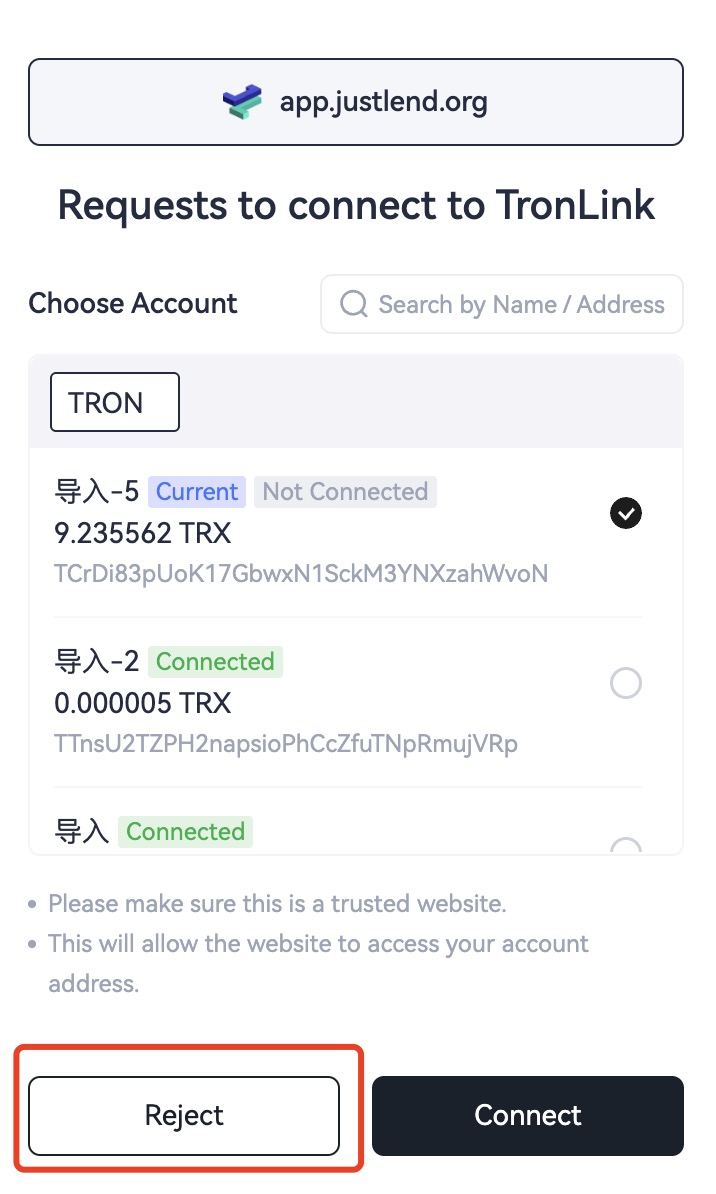
User Rejected Connection Message
Message identifier: rejectWeb
Generated when:
- A DApp requests connection and the user rejects it in the popup.
 { width="350" }
Developers can listen for this message:
window.addEventListener('message', function (e) {
  if (e.data.message && e.data.message.action == "rejectWeb") {
      // handler logic
      console.log('got rejectWeb event', e.data)
  }
})
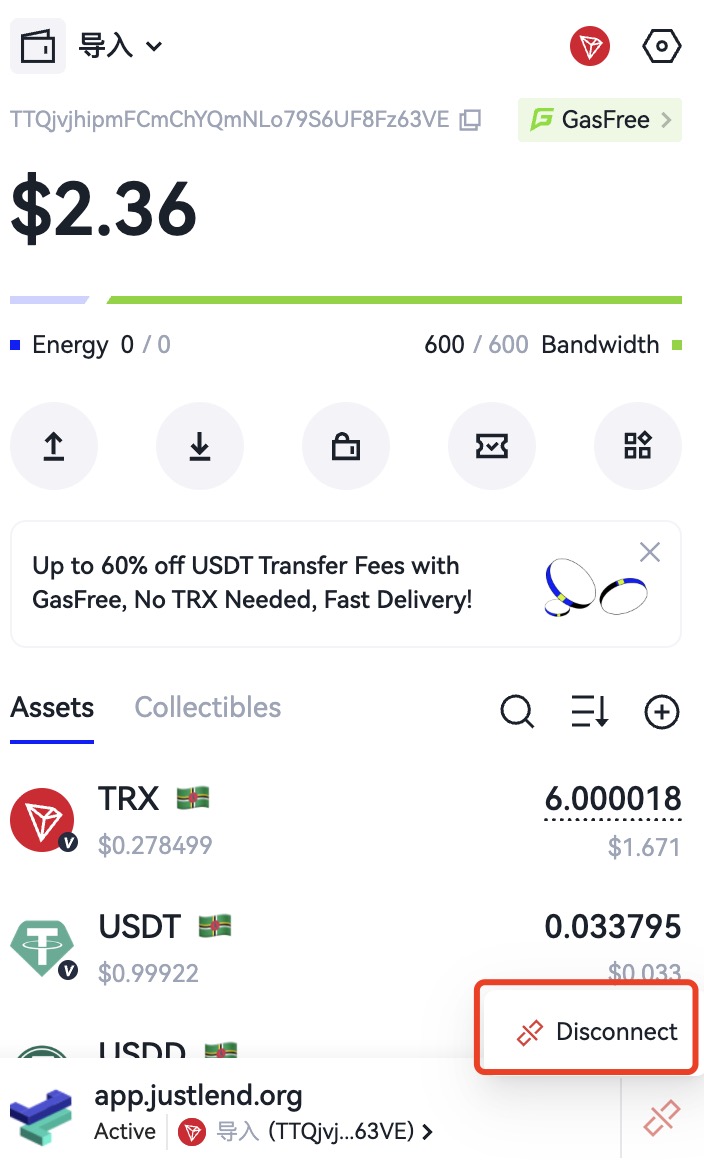
User Disconnected Website Message
Message identifier: disconnectWeb
Generated when:
- The user manually disconnects the website.
 { width="350" }
Developers can listen for this message:
window.addEventListener('message', function (e) {
  if (e.data.message && e.data.message.action == "disconnectWeb") {
      // handler logic
      console.log('got disconnectWeb event', e.data)
  }
})
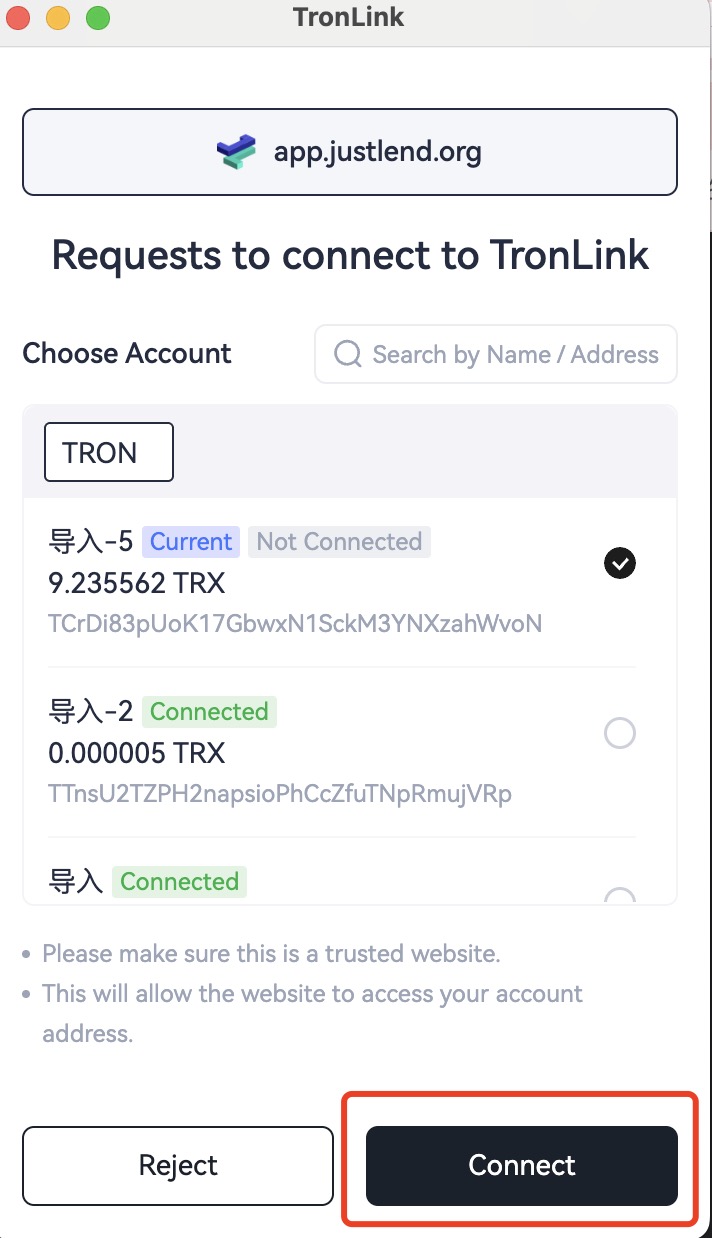
User Confirmed Connection Message
Message identifier: acceptWeb
Generated when:
- The user confirms the connection request.
 { width="350" }
Developers can listen for this message:
window.addEventListener('message', function (e) {
  if (e.data.message && e.data.message.action == "acceptWeb") {
      // handler logic
      console.log('got acceptWeb event', e.data)
  }
})
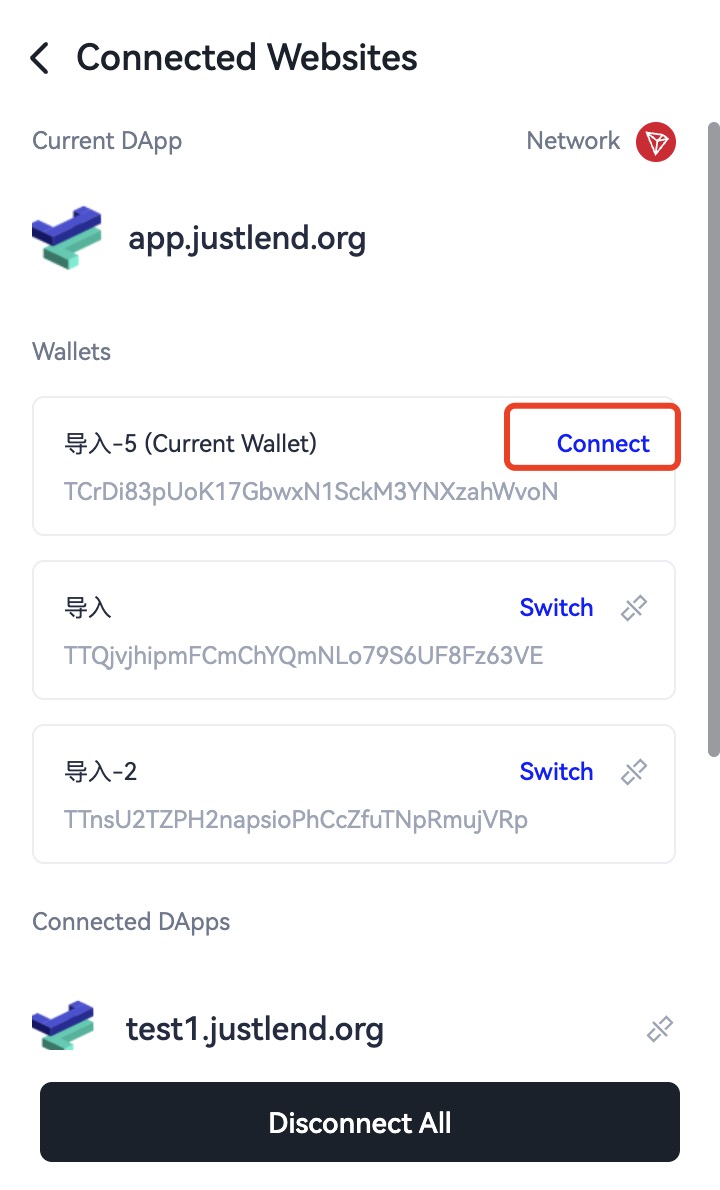
User Proactively Connected Website Message
Message identifier: connectWeb
Generated when:
- The user proactively connects to the website.
 { width="350" }
Developers can listen for this message:
window.addEventListener('message', function (e) {
  if (e.data.message && e.data.message.action == "connectWeb") {
      // handler logic
      console.log('got connectWeb event', e.data)
  }
})
Deprecated 3.x Events (Mainchain / Sidechain)
The following events were used by TronLink 3.x to detect the active network and account via raw window.postMessage. They have been superseded by the modern accountsChanged / chainChanged listeners on window.tron and are kept here for reference only — new integrations should not use them.
Network Initialization (tabReply)
Fired once after page load when TronLink finishes initializing. Inspect e.data.message.data.data.node.chain to determine whether the wallet is on the mainchain ('_') or a sidechain (any other identifier).
window.addEventListener('message', function (e) {
  if (e.data.message && e.data.message.action == "tabReply") {
    if (e.data.message.data.data.node.chain == '_') {
      console.log("tronLink currently selects the main chain");
    } else {
      console.log("tronLink currently selects the side chain");
    }
  }
});
Account Switch (setAccount)
Fired when the user switches the active account.
window.addEventListener('message', function (e) {
  if (e.data.message && e.data.message.action == "setAccount") {
    console.log("current address:", e.data.message.data.address);
  }
});
Network Switch (setNode)
Fired when the user changes the network. Same chain == '_' convention as tabReply.
window.addEventListener('message', function (e) {
  if (e.data.message && e.data.message.action == "setNode") {
    if (e.data.message.data.node.chain == '_') {
      console.log("tronLink currently selects the main chain");
    } else {
      console.log("tronLink currently selects the side chain");
    }
  }
});